NFL Hard Yardage
NFL Hard Yardage (Strata Group, Inc., 1993) · Manual · 40 pages · 33 sections · original scan
| NFL HARD YARDAGE
INSTALLATION MANUAL
Strata Group, Inc.
Service/Saces (800)262-0323 Fax (708)870-0120
Hardware and Software © Copyright 1993 Incredible Technologies, Inc. All rights reserved. NFL Shield and Team Insignias ©/TM NFL Properties, Inc. All rights reserved. NFL Footage Copyright NFL Films, Inc. All rights reserved.
An Officially Licensed Product of the NFL.
Warranty, Repair and Return Policy. Return Merchandise Authorization.. FCC Regulation Compliance. Game Contents..... Game Description... Recommended Toolsand Supplie: Installation Preparations. The Cabinet. Control Panel Preparation: Graphic Installations. Wiring and Hardware Installation Sound System... Initial Power-Up DIP Switch Chart Test/Service Buttons. Applying Power.. Strata Test Mode. Operator Adjustables. NN=ONoOURARWWWNNN
General Troubleshooting 4 STRESS COMMECUON Sac cccu ler uncwwi cane sxtercet dcidvach cesdvacan bea dv raisin resWabaletintivs
NFL Hard Yardage-!
Warranty,
Repair and
Return Policy
Retum Merchandise Authorization
FCC
Regulation Compliance
2-NFL Hard Yardage
- Full 90-day warranty on all electronic components. All warranty periods begin on the date of purchase from Strata Group, Inc.
- There is a minimum $40.00 service charge for all non-warranty repairs or returns.
- For all servicing return to Strata Group, Inc.
- ANY non-factory repair or attempted repair voids warranty.
- AAMA decal must not be removed from the PCB.
- All returned merchandise must have a Return Merchandise Authorization (RMA) number marked clearly on the outside of the package.
- You must obtain all RMA numbers from your authorized Strata Group, Inc. distributor. Please have your Strata Group, Inc. serial number available when calling for an RMA number.
- Merchandise returned without an RMA number will not be accepted.
- Advance replacement boards will be shipped to distributors or, at the distributor's request, will be shipped directly to the operator.
- Advance replacement boards will be billed to the distributor until Strata Group, Inc. receives the returned board, at which time a credit will be issued.
- All repairs and/or replacements will be shipped within 24 hours of receipt or request (subject to availability).
This equipment complies with the limits for a Class A digital device pursuant to Part 15 of the FCC Rules. These limits are designed to provide reasonable protection against harmful interference when the equipment is operated in a commercial environment. This equipment uses and can radiate radio frequency energy and, if not installed and used in accordance with the instruction manual, may cause harmful interference to radio communications. Operation of this equipment in a residential area is likely to cause harmful interference in which case the user will be required to correct the interference at his own expense.
UPRIGHT KIT ) Printed Circuit Board (PCB)
- Connecting Wire Harness (JAMMA)
- Player 3 Wire Harness
- Player 4 Wire Harness
- Joystick Assemblies
- Button Assemblies
- Control Panel Overlay
- Set of Function Labels
- Instruction Card
- Manual
One to four players can play at the same time. Insert coins for credits Two credits gives a player one period in a 4-period game. Eight credits gives a player a full game. Players select any of the 28 official NFL teams. Each team has player and team attributes that are true to the official NFL teams.
To Select a Play Move joystick to choose your formation type and press the select button. Then move joystick to select your play and press the button.
On Offense Press the select button or pull back on the joystick to snap the ball. Press the pass button to throw or hand-off the ball. Use the joystick to run up the field to tryand score a touchdown.
On Defense Press the select button to choose the player you wish to control. Move the joystick to maneuver your player into position. Press the JUMP button to activate a super tackle.
Experiment with different button and joystick combinations to find hidden maneuvers and special features.
Heat Shrink Tubing (3/32", 1/8", and 3/16") Masking Tape 3-1/2" or 4" Wire Ties Mild Liquid Soap and Water Solution Painting Supplies Air Brush or Paint Sprayer Paint Roller and Pan Phillips and Slotted Screwdrivers Socket Set Wire Cutters and Strippers Pliers or Channel Locks Electric Drill with 3/32", 1/4", and 7/16" Bits Small File Razor Knife and Sharp Blades Straight Edge Paint Brush Staple Gun and Staples Paint (and Primer) 1-3/16" Chassis or Sheet Metal Punch Sand Paper Soldering Iron Putty Knife 60/40 Resin Core Solder Wood Putty Vacuum Cleaner Assorted Fastening Hardware
Game Description
Game Contents
NFL Hard Yardage-3
Installation Preparations
The Cabinet
4-NFL Hard Yardage BEFORE YOU START
- Have you checked to see if all the needed parts have been included? See the GAME PACKAGE CONTENTS on page 3.
- Isthe game you have chosen to convert able to supply all the required voltages for the new game (+5vde & + 12 vde)?
- Is the monitor configuration compatible? It can be difficult to change the monitor from a vertical to a horizontal mount. Installation will be easier if you choose a horizontal mount cabinet.
- Do you have the necessary tools? Check RECOMMENDED TOOLS & SUPPLIES on page 3
POWER AND MONITOR REQUIREMENTS
POWER +5VDV 5 amps +12 VDC 2 amps
CABINET SELECTION You can choose either a new cabinet or a used cabinet for your new game. Reusing a cabinet is by far the most cost-effective way to maximize the return of your initial investment. In either case, all you provide is the cabinet with a power supply and monitor. We provide the rest. The end result is a new game ata very low cost.
Spend time on the cabinet’s appearance (i.e., marquee, control panel, and cabinet graphics). You will raise your profits with the introduction of a new game package, especially if the cabinet looks clean and new.
The “new game look” should always apply to the inside of your game as well. A few wire ties and shrink tubing on your harness, some fastening hardware on your subassemblies, and a sweep with the vacuum cleaner will ensure that glitches do not occur.
PREPARING A USED CABINET FOR THE NEW GAME Remove the following: Main Logic Board(s) Control Panel Monitor Plexiglas Monitor Bezel Marquee Cabinet Graphics AVMs WN
Thoroughly clean out your cabinet. Remove all the old buttons, joysticks and wires fromthe control panel and set aside. Remove the original overlay. DO NOT remove monitor and speaker wires.
If your cabinet has wood grain sides, remove the old graphics and adhesive. Remove adhesive with lacquer thinner.
Fora fresh look, painting is highly recommended. Spray painting gives a better finish but if an air brush or paint sprayer is unavailable, a roller is second best. Cover all exposed surfaces not to be painted, suchas the coin door and monitor. Use a small brush to finish up the details. If you do not have the facilities for painting, try an auto body shop.
NFL Hard Yardage has been designed as a four-player game. It is recommended that your control panel accommodate up to four players. Try to allow for enough room so players will not feel crowded or uncomfortable. If your cabinet only allows for two players at a time, NFL Hard Yardage can be made a 2-player game through the DIP Switch Settings. DIP Switch 2 in the ON position will allow for four players. DIP Switch 2 in the OFF position will limit the game to a two player game.
- Mark positions for the joysticks and buttons on the control panel. Use the diagram below for correct positioning. Try to space all sets of controls evenly. Some special moves require both the PASS/JUMP and SELECT buttons be pressed simultaneously, Be sure to place each set of buttons close together so they can both be pressed at the same time.
- Drillor punch the holes marked for buttons or bolts. Use a chassis or sheet metal punch for best results on button holes.
- Use a file to smooth any rough edges on the new holes.
- Fill any old and unused holes with a wood or metal plate.
It is recommended that you cover your control panel with plexiglas. Now would be a good time to cut it to fit while the dimensions and tools are at hand. [S) [S) [Ss Ss \ a (STS oc
4-Player Control Panel Layout
i
2-Player Control Panel Layout
Control
Panel
Preparations
NFL Hard Yardage-5
CONTROL PANEL OVERLAY Graphic Make sure the control panelis clean and free from dust, grease, metal filings, and = sawdust. The lexan background overlay provided with NFL HARD YARDAGE is Installation oversized to accommodate most control panel sizes. The lexan overlay must be centered along its length. Be sure to leave enough excess material above and belowthe control panel surface, especially if you have to wrap the overlay around the panel edges.
Remove the protective backing from the lexan overlay. Center the lexan overlay over the control panel and place down gently, making sure to keep it square. Using your hands, press down firmly, starting from the center and smooth the lexan overlay outward, making sure all bubbles have been pressed out for a clean, flat surface.
Usinga sharp razor knife, trim any excess from the lexan overlay. Carefully pierce through overlay above each control panel hole that you have marked. Cut out material covering pre-drilled holes with the razor knife. Be sure to cut the lexan overlay above each hole and trim cleanly and evenly.
FUNCTION LABELS The supplied function label set supplied with NFL HARD YARDAGE has been designed to accommodate either a 4-player or a 2-player game. In both cases, the controls and labels for the players on the left should be all RED and the controls and labels for the players on the right should be all BLUE. This color scheme will help players identify with Team and Play Selection during the game. Refer to the diagrams below for correct button and label placement.
Player 1 and 2 controls Player 3 and 4 controls and labels are RED. and labels are BLUE. Gh Ge STAAL] ]
- 1 Bruyn 2 | OOO
4-PLAYER LABELS
Player 1 controls and Player 2 controls and labels are RED. labels are BLUE. Gh Gi O O NOTE START BUTTONS | O ele © ele} ARE WHITE. | Ca 2-PLAYER LABELS Line up the supplied function labels with the corresponding control panel holes. Remove the backing and carefully press into place. Be sure they are straight.
6-NFL Hard Yardage
BUTTON AND JOYSTICK INSTALLATION Install the controls into the control panel assembly. If you are using plexiglas for added protection, don’t forget to place it on the panel before inserting the buttons. In a four player game, RED BUTTONS are used for PLAYER ONE and PLAYER TWO on the left-most side of the control panel. The BLUE BUTTONS are used for PLAYER THREE and PLAYER FOUR on the right side of the control panel. The WHITE BUTTONS are used as START BUTTONS.
For a 2-player configuration, PLAYER ONE (on the left) uses RED buttons and PLAYER TWO uses BLUE buttons (on the right). Two WHITE BUTTONS are used as PLAYER START buttons.
Wire the PLAYER ONE and PLAYER TWO buttons to the JAMMA harness from the wiring diagram on page 31. PLAYER THREE and PLAYER FOUR harnesses are separate from the JAMMA harness. Wire PLAYER THREE and PLAYER FOUR buttons to these harnesses from the wiring diagram on pages 32 and 33.
MARQUEE INSTALLATION Using the old marquee glass as a template, center the plexiglas on your new marquee graphics, making sure that all the printed images will be visible. Using arazor knife, score the new marquee deeply, following the edges of the old glass. Carefully break off the styrene. Be sure the light behind the marquee works and that the glass is clean on both sides. Nowinstall the marquee graphics and glass securely.
REMEMBER! DO NOT work with any part of the system plugged in (lights, monitor, or power supply).
CONTROL PANEL ASSEMBLY Install all buttons on the control panel as per the control panel configuration. (See illustration on page 6.)
PRINTED CIRCUIT BOARDS Mount the PCB to the side of the cabinet with the edge connector toward the top. This will keep the wire harness from slipping off due to vibration. Using the board standoffs as a guide, mark where to drill the mounting holes. Drill pilot holes (3/ 32") being careful to not drill through to the outside. Attach the PCB standoffs to the cabinet using wood screws and spacers — snug but not too tight or the board may warp or crack. Be sure the board is not being flexed in any way.
NFL Hard Yardage-7
8-NFL Hard Yardage WIRE HARNESS If you are installing this game into a Dynamo cabinet with a pre-installed JAMMA harness, you will notice that it does not have a wire for the test switch. You will have to adda contact to the edge connectorat the proper position (position 15). Some cabinets (Dynamo included) have only one coin switch input and the coin switches are wired together. Connect the designated wires to the coin switches separately. See JAMMA HARNESS CONNECTIONS on page 31.
Attach the wire harness connector to the PCB. This connector should be keyed. Be sure to mountit correctly. Incorrect mounting will cause damage to the PCB.
PLAYER THREE AND FOUR HARNESS DESCRIPTION Player 3 and 4 are connected using two separate sets of cables, supplied in this kit. (Check pages 32 and 33 to find out the color coding of each.) Connect each cable to the two white right angle connectors adjacent to the JAMMA connector.
PLAYER 3. PLAYER 4 CONNECTION CONNECTION [=a pip PIN 1 PINT SWITCHES U
JAMMA CONNECTION NFL HARD YARDAGE VIDEO BOARD IECEUTITENTCET
i FUSE
COMPONENT SIDE VIEW OF MAIN PCB
Be sure to match pin | on the cable to pin | on the connector. If the 4-player mode is Used, be sure that DIP switch 2 on the PCB is set to the ON position.
Itis best to use connectors (not supplied) whenever joining a set of harness wires toa subassembly. If you choose to solder wires together, follow this procedure:
- Strip off about 1/2" of insulation from the black wire.
- Slide a piece of heat-shrink tubing over the end.
- Do notleave a lot of excess wire spooled up in your cabinet. Cut the wires to the length you need plus a few extra inches. Leave enough for proper cable dressing-do not make it stretch across the inside of the cabinet.
- Solder the new wire to the original wire. Use a straight in-line splice.
- Melt the heat-shrink over the splice.
POWER WIRES 1, Connect the wires that are designated for your power supply. You will need a supply of +5 vdc, and + 12 vdc. The +5 vdce must be regulated to within 5% (+ or- 0.25 vde). The + 12 vde may be unregulated but should not stray too far or the sound may be affected. If the cabinet’s supply does not provide these voltages, it will have to be replaced. A switching-type supply is recommended.
- You will notice that you have more than one wire for each voltage. Use all wires supplied on the harness. This will ensure better power transmission and prevent overloading of the edge connector pads.
- Tin all power supply wires before connecting them to the power supply. Loose strands may short out the supply. For best results, connect spade lugs to the ends of the power wires and attach to the screw terminals of the power supply.
ALWAYS solder all wire splices. Just twisting the wires together will cause intermittent problems inthe future.
ALWAYS use shrink tubing over wire splices. NEVER use electrical tape. Electrical tape may unravel due to the heat inside the cabinet.
ALWAYS use wire ties to keep associated wires bundled. Attach to the cabinet where ever it seems necessary to keep them neat and secure.
AVOID bundling unrelated wires (such as the control panel and the monitor) as this may increase the likelihood of intermittent problems due to noise. Run different bundles separately.
COIN DOORS AND TEST SWITCH WIRING Wire the coin doors and the test switch as per the JAMMA HARNESS CONNEC- TIONS information on page 31.
1, Connect the door lamps tothe + 12 vdc supply. Some games have separate power supply outputs for the lamps.
- Mount a test switch (not included) somewhere convenient inside the coin door area. This switch allows you to enter adjustables, run diagnostics, and see or clear audits. Make it readily accessible through the coin door. Wire it to the Test wire on the JAMMA Harness.
- Clean and lubricate your coin mechs.
NFL Hard Yardage-¢
Sound
System
10-NFL Hard Yardage MONITOR WIRES You will be connecting the RED, GREEN, and BLUE video drives along with the composite SYNC and video GROUND wires.
SYNC This is the recommended approach for a Wells-Gardner monitor and should work with some others as well.
This game generates a composite sync signal which is accepted by most monitors. A DIP switch (SW1 Position 4) on the logic board allows you to choose between positive and negative composite sync. Most monitors require negative sync. If your monitor requires positive sync, flip the switch towards the OFF position.
If your monitor does not have a composite sync input but has separate horizontal and vertical sync inputs, try connecting the composite sync signal from the PCB to the negative horizontal sync signal on the monitor. This should produce a satisfactory result, although some adjustment of the monitor's sync controls may be necessary.
FINISHING TOUCHES
- Check the game inside and out for any imperfections. Secure any loose wiring or fastening hardware.
- Make sure the coin door is tight and the coin mechs are well adjusted.
- Make sure all assemblies are firmly attached. Anything that is not mounted securely will rattle when the game is played. This game makes use of lowfrequency sounds which can cause any loose joints to rattle.
STEREO SOUND Asound system is only as good as its weakest link. Make sure your cabinet setup does not have any weak links:
- Power supply needs at least 2 amps on the 12-volt supply
- Use two speakers, each capable of reproducing sound from 100Hz to 15kHz
- Both speakers must be wired in phase and properly placed in the cabinet.
Good conversion cabinets generally have two speaker holes, but might have inferior speakers. You will not be able to benefit from STRATA'S superior sound system if your speakers have any of the following problems:
- Low efficiency (for a given input, the resulting sound output is low)
- Poor frequency response (the speakers’ bandwidth is limited, thus only reproducing sounds in the middle of the audio spectrum)
- Inadequate power handling capability (typically cannot handle more than 6-8 watts at 4 ohms). STRATASOUND's stereo amp can produce up to 12 watts without distortion.
GET GREAT SOUND FROM YOUR NFL HARD YARDAGE KIT Upgrading your cabinet's speakers will greatly enhance the sound quality. Replace the $2.00 speakers with $6.00 speakers available through your distribu-
tor or a reputable electronics store, such as Radio Shack. Part numbers 40- 1909B and especially 40-1268C are good choices.
Mount the speakers properly. Connect the speaker wires, paying attention to their polarity.
If your cabinet has two speakers, connect them both
Position the speakers as far from the monitor as possible. If placed too close, the speaker's magnet may deflect the monitor and cause strange coloration, which can usually be corrected by degaussing the monitor.
Be sure to attach each speaker securely with all four screws to minimize vibration and rattling. Make sure everything else in the cabinet is attached securely for the same reason.
Ensure that the speaker gasket is deep enough to keep the speaker cone from rubbing against the protective material (screen or vinyl grill material). When you connect the speakers (using the supplied JAMMA harness), pay attention to:
Orientation L(Yellow-Green) - 10(Yellow-Red) to left speaker M(White-Green) - | 1(White-Red) to right speaker Proper Phasing L(Yellow-Green) to left speaker negative 10(Yellow-Red) left speaker positive M(White-Green) right speaker negative 11(White-Red) right speaker positive
- use the wire at the same position of your JAMMA harness
- if there are no wires at these positions, you can use the 4-pin Molex speaker output connector at JP3 (see diagram on page 8).
- the orientation of the signals is on the legend of the board.
FINAL CHECK
- Carefully inspect the game for loose power wires, exposed connections, and extra fastening hardware. Look for any stray strands from wires.
- Make sure the PCB, monitor, power supply, and speakers are secure.
- Doublecheck your connections.
- With the board disconnected from the JAMMA harness, turn the power on and adjust the +5 vdc supply to be as close to +5 vdc as possible. This is very
Inital Power-Up
NFL Hard Yardage-11
DIP Switch Chart
Test/Service Buttons
Applying
Power
12-NFL Hard Yardage SETTING THE DIP SWITCHES Position 4 (OFF): positve video sync. Position 4 (ON): negative video sync. Position 3 (ON): Upright Position 2 (ON): 4-player Mode Position 2 (OFF): 2-player Mode Position 1 (ON): Game Mode Position 1 (OFF): Strata Test Mode
Install a service switch inside the coin door area. The service switch allows the operator to give credits to players without affecting the game's credit audits or coin meters. Example: A player puts in a coin and gets no credit, the operator can then push the service button (found in the cabinet) and a credit is given to the player without affecting the game's AUDITS and coin meter.
- Attach JAMMA Harness if needed. Plug in the game and turn it on.
- Lookandsmellforsmoke (TURN IT OFF IMMEDIATELY IF ANYIS NOTICED).
- Make sure the green and yellow LEDs on the PCB are flashing. If not, something is wrong, turn off the game.
- Listen for sound. A few notes or some speech should play on power up.
- If you do not hear any sounds and the yellow LED is flashing, try turning up the volume and check the speaker connections. Dropping a coin through a coin switch should cause a sound.
- Look at the image on the monitor. If it is not in sync and you cannot stop it from rolling by adjusting the monitor's sync controls, try flipping SW4 on the logic board
- Howis the picture? Is it centered or is it too bright or too dim? Is it in focus? Check your monitor manual to make adjustments. Some test patterns are available through the game's system tests by pressing the Test switch. Use them when making any adjustments. See “SYSTEM TESTS” information on page 13. Proper monitor adjustment is very important
- Try all coin switches. Drop quarters or tokens through to check the coin mechs. Make sure the game is adding credits. You can use the Player Control Tests by pressing the test switch and entering the System Tests Menu. Do the joystick and push buttons work? Try playing the game with the volume up and listen for rattling as you play. Tighten anything that is making noise.
- Upon initial power-up, the game will initialize to factory default settings. These settings affect game elements such as number of credits per coin, difficulty settings, etc. The “OPERATOR MODE” section will describe how to alter these settings and view the system audits or run system tests
NFL Hard Yardage comes equipped with a test button that allows you to testand customize your game. A DIP switch on the PCB will also access the test mode.
To enter Strata Test Mode, press the Test Button. Flip DIP Switch 1 to the OFF position when the Strata Test Mode is accessed. The screen displays the Main Service Menu.
The Main Service Menu allows you to enter into three different areas:
NFL HARD YARDAGE V1.00
JOYSTICK UP AND DOWN TO SELECT. PRESS START TO CHOOSE
MAIN SERVICE MENU
EXIT
OPERATOR ADJUSTABLES MENU.
GAME AUDITS MENU
SYSTEM TESTS MENU
MAIN SERVICE MENU
OPERATOR ADJUSTABLES is used for customizing your game for your location. Some of the features in Operator Adjustables are number of coins per game, sounds on or off when no one is playing, difficulty settings, ete,
GAME AUDITS allows you to check your game's overall earnings, gametimes,
game scores, etc. The Audits can be reset through this menu as well.
SYSTEM TESTS tests the integrity of the hardware, controls, and monitor through easy and automatic procedures accessed through these menus.
To exit any of these tests and return the game to its normal state, use any player Joystick to highlight the line that says EXIT and press any player start button.
NFL Hard Yardage-13
Operator Adjustables
14-NFL Hard Yardage COLOR KEY For easy identification, all test screens have been color coded. Items displayed in GREEN are the Menu titles. This is the name of the menu that is currently displayed. Items appearing in YELLOW are the menu's instructions. The BLUE items are choices available in this menu. The WHITE item is the selection that is currently highlighted. If RED is ever displayed there is a problem with that item and it should be corrected.
OPERATOR ADJUSTABLES The Operator Adjustables section is accessed through the Main Service Menu. From the Main Service Menu, move any player joystick down until the word OPERATOR ADJUSTABLES MENU appears in white letters. Now press any Player Start button, and the Operator Adjustables Menu will appear on the screen.
NFL HARD YARDAGE V1.00
JOYSTICK UP AND DOWN TO SELECT. PRESS START TO CHOOSE
OPERATOR ADJUSTABLE MENU
EXIT ADJUSTABLES
GAME MODE SELECTION
GAME RESETS
ATTRACT MODE SOUNDS
CREDITS AND PLAYING TIME SETTINGS
TEAM PERFORMANCE BOOST
STEREO SOUND SELECTION
SKILL LEVEL ADJUSTMENT
HORIZONTAL SCREEN ADJUSTMENT
OPERATOR ADJUSTABLES MENU
As you can see, there are a lot of possible customizing procedures that you can control. Below is a brief description of each adjustable function and what the screen looks like when displayed. Remember, to select an item from any menu, use any player joystick to highlight the item in white, and then press any Player Start button
GAME MODE SELECTION This menu allows you to place the game in standard Coin Mode, or choose Free Play.
NFL HARD YARDAGE V1.00
JOYSTICK UP AND DOWN TO SELECT. PRESS START TO CHOOSE
GAME MODE SELECTION
COIN MODE
FREE PLAY
GAME MODE SELECTION SCREEN
In COIN MODE, the game will only work if coins are deposited into the game. In FREE PLAY, coins are not needed for play, and the Start buttons are always active.
GAME RESETS The Game Resets Menu will cancel orzero out anycustom features or bookkeeping figures that are no longer wanted.
NFL HARD YARDAGE V1.00
JOYSTICK UP AND DOWN TO SELECT. PRESS START TO CHOOSE
GAME RESETS
EXIT RESETS
RESET ALL TO FACTORY SETTINGS
RESET SEASON STATS ONLY
RESET AUDITS ONLY
GAME RESETS SCREEN
RESET ALL TO FACTORY SETTINGS will change the game back to the way the game was pre-set when new. Any custom features such as Free Play and Skill Levels will be changed back to the original settings set at the factory.
RESET SEASONSTATS ONLY willleave all of your custom adjustments intact, but will erase any current season stats from the game’s displays. This comes in handy when running a competition or changing the difficulty settings on the game.
RESET AUDITS ONLY is used when all of your bookkeeping and statistics have been gathered from the Audits section, and are no longer needed. If you like to gather all of your accounting information each week, or after each collection, it is a good practice to reset all of the audits so your coin count will match the audit information.
NFL Hard Yardage-15
ATTRACT MODE SOUNDS This menu is used to adjust the sounds that are heard while no one is playing the game.
NFL HARD YARDAGE V1.00
JOYSTICK UP AND DOWN TO SELECT. PRESS START TO CHOOSE
ATTRACT MODE SOUND
ALL ATTRACT MODE SOUNDS OFF
OCCASSIONAL ATTRACT MODE SOUNDS
ALL ATTRACT MODE SOUNDS ON
ATTRACT MODE SOUNDS MENU
ALL ATTRACT MODE SOUNDS OFF will not allow any sounds to be played during the attract mode. OCCASIONAL ATTRACT MODE SOUNDS plays sounds about every ten or twelve times the attract mode is repeated ALL ATTRACT MODE SOUNDS ON will play sounds during every attract cycle.
CREDITS AND PLAYING TIME SETTINGS This menu allows you to change the number of coins needed to play NFL Hard Yardage, as well as the average play time per coin
NFL HARD YARDAGE V1.00
JOYSTICK UP AND DOWN TO SELECT. PRESS START TO CHOOSE
CREDITS AND PLAYING TIME SETTINGS
EXIT CREDITS AND PLAYING TIME
DOOR 1 CREDITS PER COIN
DOOR 2 CREDITS PER COIN
DOOR 3 CREDITS PER COIN
DOOR 4 CREDITS PER COIN
CREDITS NEEDED TO START
CREDITS NEEDED TO CONTINUE
CREDITS TO BUY COMPLETE GAME
SCOREBOARD CLOCK SPEED
TO CHANGE VALUES MOVE JOYSTICK LEFT TO DECREASE MOVE JOYSTICK RIGHT TO INCREASE
CREDITS AND PLAYING TIME SETTINGS SCREEN
16-NFL Hard Yardage
You can set each coin door at different credit values by highlighting DOOR 1 CREDITS PER COIN for coin door | or DOOR 2 CREDITS PER COIN for coin door
- Moving any player joystick left or right will change the number of credits that each coin represents.
CREDITS NEEDED TO START will adjust the number of credits it takes for a player to begin a game. For example, the factory setting is 1 coin per credit, but it takes two credits to begin a game. Therefore, two coins are needed to begin a game.
If you want the number of credits needed to continue a game already in progress to be different than the number of credits needed for the initial game start, you can set the new value using CREDITS NEEDED TO CONTINUE.
Acomplete game, consisting of four football quarters, is factory set at 8 credits. Use CREDITS TO BUY COMPLETE GAME if you wish to change the number of credits needed to play a complete game.
Playing time is bought in increments of football quarters. Each credit gives the player a certain amount of playing time per credit. The game clock displayed on the scoreboard during the game will always show that a quarter lasts 15:00, but you can determine howfast the clock ticks down tozero. Highlight SCOREBOARD CLOCK SPEED and changeit to a higher number to make the clock count faster, or a smaller number to make the clock tick slower.
TEAM PERFORMANCE BOOST This setting can be used to improve a team’s overall abilities.
NFL HARD YARDAGE V1.00
TEAM PERFORMANCE BOOST
TEAMS IN WHITE ARE BOOSTED
MOVE JOYSTICK TO SELECT TEAM PRESS SELECT TO CHANGE BOOST
PRESS START TO EXIT
CINCINNATI BENGALS BUFFALO BILLS DENVER BRONCOS CHICAGO BEARS TAMPA BAY BUCS PHOENIX CARDINALS CLEVELAND BROWNS SAN DIEGO CHARGERS KANSAS CITY CHIEFS INDIANAPOLIS COLTS MIAMI DOLPHINS NEW YORK JETS HOUSTON OILERS NEW ENGLAND PATRIOTS LOS ANGELES RAIDERS SEATTLE SEAHAWKS PITTSBURGH STEELERS DALLAS COWBOYS PHILADELPHIA EAGLES ATLANTA FALCONS SAN FRANCISCO 49ERS NEW YORK GIANTS DETROIT LIONS GREEN BAY PACKERS LOS ANGELES RAMS WASHINGTON REDSKINS NEW ORLEANS SAINTS MINNESOTA VIKINGS
TEAM PERFORMANCE BOOST SCREEN
NFL Hard Yardage-17
18-NFL Hard Yardage Move any player joystick to select the team that you would like to make play better. The selected team will begin flashing. Press any Player Select button. The team name will change from blue to white, indicating that the Performance Boostisactive. This feature is a clever addition to add to your home team, which is likely to be played most often. Giving the home team an added advantage over the competition is a nice way to reward fans and players.
STEREO SOUNDS SETTINGS NFL Hard Yardage comes factory set with high-fidelity stereo sounds.
NFL HARD YARDAGE V1.00
JOYSTICK UP AND DOWN TO SELECT. PRESS START TO CHOOSE
STEREO SOUNDS SELECTION
STEREO SOUNDS
MONO SOUNDS
STEREO SOUNDS SELECTION SCREEN It is highly recommended that this setting remain on STEREO SOUNDS, so players can experience the full range and power of the audio soundtrack. If for some reason you are unable to play stereo sounds, highlighting MONO SOUNDS will force all of the sounds through one speaker and boost the overall fidelity of the game's sound track.
SKILL LEVEL ADJUSTMENT NFL Hard Yardage allows for changing the level of skill needed to play the game. This feature is good for locations with younger or novice players who are less skilled at the game, or expert or accomplished players who demand a greater challenge.
NFL HARD YARDAGE V1.00
JOYSTICK UP AND DOWN TO SELECT. PRESS START TO CHOOSE
SKILL LEVEL ADJUSTMENT
SKILL LEVEL 1 - EASIEST
SKILL LEVEL 2
SKILL LEVEL 3
SKILL LEVEL 4
SKILL LEVEL 5 - HARDEST
SKILL LEVEL ADJUSTMENT SCREEN To set the game to an easy skill level, highlight SKILL LEVEL 1 - EASIEST. To set the game to a difficult skill level, highlight SKILL LEVEL 5 - HARDEST. SKILL LEVEL 2, SKILL LEVEL 3, and SKILL LEVEL 4 are settings between the easiest and hardest levels. Some times it is best if the skill level is adjusted gradually over a period of time.
HORIZONTAL SCREEN ADJUSTMENT The monitor on NFL Hard Yardage should be adjusted properly to give the best picture possible. If for some reason the picture is not centered, use this menu to correct the problem.
NFL HARD YARDAGE V1.00
JOYSTICK UP AND DOWN TO SELECT. PRESS START TO CHOOSE
HORIZONTAL SCREEN ADJUSTMENT
SCREEN ADJUST - 1 LEFT MOST
SCREEN ADJUST - 2
SCREEN ADJUST -3 CENTER
SCREEN ADJUST - 4
SCREEN ADJUST -5 RIGHT MOST
HORIZONTAL SCREEN ADJUSTMENT SCREEN
SCREEN ADJUST - 1 LEFT MOST will move the picture far to the left. SCREEN ADJUST -5 RIGHT MOST will move the picture far to the right. SCREEN ADJUST -3 CENTER will attempt to center the picture on the video monitor.
The Audits section will supply you with a detailed accounting of helpful and informative bookkeeping and statistics. To enter the Audits section, first go to the Main Service Menu by pressing the test switch or flip DIP switch 1 to the OFF position on the PCB. From the Main Service Menu, move any joystick down until the word GAME AUDITS MENU appears in white letters. Now press any Player Start button, and the Game Audits Menu will appear on the screen.
NFL HARD YARDAGE V1.00
JOYSTICK UP AND DOWN TO SELECT. PRESS START TO CHOOSE
GAME AUDITS MENU
EXIT AUDITS
REVIEW AUDITS
RESET AUDITS
GAME AUDITS SCREEN To look at the current statistics, highlight REVIEW AUDITS and press any Player Start button.
To set all of the statistics back to zero, highlight RESET AUDITS and press any Player Start button.
NFL Hard Yardage-1
20-NFL Hard Yardage REVIEW AUDITS When you choose to review the audits, the Audits Review Screen will appear.
NFL HARD YARDAGE V1,.00
PRESS START TO EXIT
REVIEW AUDITS
GAMES STARTED GAMES COMPLETED INDIVIDUAL GAMES STARTED SEASON GAMES STARTED SEASONS COMPLETED COMPLETE GAMES PURCHASED 1ST QUARTER COMPLETED 2ND QUARTER COMPLETED 3RD QUARTER COMPLETED 4TH QUARTER COMPLETED OVERTIME COMPLETED AVERAGE HUMAN SCORE AVERAGE COMPUTER SCORE COIN DOOR 1 COINS COIN DOOR 2 COINS COIN DOOR 3 COINS COIN DOOR 4 COINS TOTAL COINS
AUDITS REVIEW SCREEN
GAMES STARTED is the total number of games that were started by pressing any one of the start buttons. GAMES COMPLETEDis the total number of full games, consisting of four periods, that were finished. INDIVIDUAL GAMES STARTED shows the number of games that were started as a single game in casual play, as opposed to season play. SEASON GAMES STARTED shows the number of times players chose Season Play during the game. SEASONS COMPLETED is the total number of players who completed season play. Season Play is a game play function that keeps track of player stats over
many games. COMPLETE GAMES PURCHASED displays the number of times players bought a full game of football, consisting of four periods, from the start of play, as opposed to adding quarters in buy-in fashion during the game 1ST QUARTER COMPLETED shows how many times games finished the first period of football. Each period begins with 15:00 on the clock and counts down to zero. There are four periods in a complete game 2ND QUARTER COMPLETED shows how many times games finished the second
period 3RD QUARTER COMPLETED shows how many times games finished the third
period 4TH QUARTER COMPLETED shows how many times games finished the fourth
period OVERTIME COMPLETED will give you the number of times this event has occurred. If a game's score is tied at the end of 4 periods, the game goes into Overtime. AVERAGE HUMAN SCORE and AVERAGE COMPUTER SCORE provide information about competition between players versus computer. The humanand computer
average scores are based on complete games played. This information can be used to adjust skill level from the skill level adjustment screen accessed through the operator adjustable menu. COIN DOOR 1 COINS is the total number of coins through Coin Door |. COIN DOOR 2 COINS is the total number of coins through Coin Door 2 COIN DOOR 3 COINS is the total number of coins through Coin Door 3 COIN DOOR 4 COINS is the total number of coins through Coin Door 4. TOTAL COINS is the total number of coins through all coin doors.
RESET AUDITS When you choose to reset the audits, the Game Resets Screen will appear.
NFL FOOTBALL V1.00
JOYSTICK UP AND DOWN TO SELECT. PRESS START TO CHOOSE
RESET AUDITS
NO RESET AUDITS
RESET AUDITS
GAME RESETS SCREEN If you wish to set all of the game audits (described above) back to zero, highlight RESET AUDITS from this menu and press any Player Start button. The screen will briefly display AUDIT RESET. If you change your mind and decide not to reset the audits to zero, highlight NO RESET AUDITS and you will exit this screen without making any changes to the audits.
The NFL Hard Yardage PCBs have been inspected and tested at the factory, and most likelythe game will be in perfect working order when youinstall them in your cabinet. If you are experiencing any problems with the game, the System Tests are a good place to start when tracking down the problem. To enter the System Tests section, first go to the Main Service Menu by pressing the test switch or set DIP Switch 1 on the PCB to the OFF position. From the Main Service Menu, move any joystick down until the word SYSTEM TESTS MENU appears in white letters. Now press any Player Start button, and the System Tests Menu will appear on the screen.
NFL HARD YARDAGE V1,00
JOYSTICK UP AND DOWN TO SELECT. PRESS START TO CHOOSE
SYSTEM TESTS MENU
EXIT TESTS
VIDEO SCREEN TESTS
SOUND TEST
PLAYERS CONTROL TEST
GROM CHECKSUM TEST
VIDEO RAM TEST SYSTEM TESTS MENU
System Tests
NFL Hard Yardage-2
22-NFL Hard Yardage VIDEO SCREEN TESTS You can test your monitor and adjust colors by choosing VIDEO SCREEN TESTS and pressing any Player Start button.
NFL HARD YARDAGE V1.00
VIDEO SCREEN TEST
TO VIEW VIDEO TEST SCREENS MOVE JOYSTICK UP OR DOWN
PRESS START AT ANY SCREEN TO EXIT
FOLLOWING SCREENS ARE AVAILABLE:
- SCREEN OUTLINE
- COLOR ADJUSTMENT
- CENTER SCREEN PATTERN
- SCREEN GRID PATTERN
- RED SCREEN
- GREEN SCREEN
- BLUE SCREEN
- WHITE SCREEN
VIDEO SCREEN TEST MENU
Test screens are viewed by moving any joystick up and down. These screens can be used to adjust the monitor. Following is a description of each screen.
SCREEN OUTLINE - A single white line around the edge of the screen
COLOR ADJUSTMENT - 12 color bldcks for adjusting colors.
CENTER SCREEN PATTERN - White grid pattern with a box in the center. Adjust the monitor to center the box.
SCREEN GRID PATTERN - White grid pattern
RED SCREEN - Screen of pure red color.
GREEN SCREEN - Screen of pure green color
BLUE SCREEN - Screen of pure blue color.
WHITE SCREEN - Screen of pure white color
SOUND TEST Choose SOUND TEST from the System Test Menu to test the sounds and
speakers in the game. The sound section also controls the coin meter, and you
can test it from this section as well.
NFL HARD YARDAGE V1.00
JOYSTICK UP AND DOWN TO SELECT. PRESS START TO CHOOSE
SOUND TESTS
EXIT SOUND TESTS
COIN METER TEST
FBSROMO0O - BUZZER SOUND
FBSROMO01 - GOOD SOUND
ROMO - TELEPHONE RING SOUND
LEFT CHANNEL SOUND
RIGHT CHANNEL SOUND
NFL HARD YARDAGE
TEAM SELECT BACKGROUND MUSIC
STOP BACKGROUND MUSIC
SOUND TESTS SCREEN
To test the coin meter, choose COIN METER TEST from this menu. If everything is working properly, the meter should increment each time any Player Start button is pressed while this line is highlighted.
FBSROMO0 tests the sound chip in SROMO. You should hear a buzzer sound if it is okay.
FBSROM01 tests the sound chip In SROMI. You should hear the word "Good" if it is okay,
ROMOtests the sound chip in ROMO. You should heara ringing sound if itis okay.
The game is wired in stereo, and the factory setting is stereo sounds. To test the stereo, choose LEFT CHANNEL SOUND to hear sounds from the left speaker, and RIGHT CHANNEL SOUND to hear sounds from the right speaker.
NFL Hard Yardage sounds feature a tremendous amount of digitized speech To test a sample of the speech, choose NFL HARD YARDAGE from this menu.
To test the background music, select TEAM SELECT BACKGROUND MUSIC,
When you want the background music to stop, select STOP BACKGROUND MUSIC and press any Player Start button.
NFL Hard Yardage-23
24-NFL Hard Yardage PLAYER CONTROL TEST Choose PLAYER CONTROL TEST from the System Test Menu to test the switches
PLAYER CONTROL SCREEN
and controls of your game cabinet The screen displays a graphic representation of the players’ control layout. Images on the screen will change color when the control is activated. Coin slots can also be tested from this screen.
Pressing the test or service button highlights the test or service text located in the lower left part of the screen
To exit the test, Player 1 and Player 2 Start buttons must be pressed at the same time
GROM CHECKSUM TEST Choose GROM CHECKSUM TEST from the System Test Menu to test the Graphics chips on the PCB
This test performs a complete test of the Graphics ROMs.
RUNNING GROM CHECKSUM TEST. 1 MINUTE TO FINISH
While the test is in progress the following message is displayed:
NFL HARD YARDAGE V.100 GROM CHECKSUM TEST
| GROM CHECKSUM | STAT | GROM CHECKSUM | STAT | ||
| ITFBO | CHECKSUM | GOOD | ITFB8 | CHECKSUM | GOOD |
| ITFB1 | CHECKSUM | GOOD | ITFB9 | CHECKSUM | GOOD |
| ITFB2 | CHECKSUM | GOOD | ITFB10 CHECKSUM | GOOD | |
| ITFB3 | CHECKSUM | GOOD | ITFB11 CHECKSUM | GOOD | |
| ITFB4 | CHECKSUM | GOOD | |||
| ITFB5 | CHECKSUM | GOOD | |||
| ITFB6 | CHECKSUM | GOOD | |||
| ITFB7 | CHECKSUM | GOOD |
[CHECKSUM TEST FAILED] -OR- [CHECKSUM TEST PASSED]
PRESS START TO CONTINUE
GROM TEST SCREEN
When the test is completed the GROM Test Screen is displayed. If all checksums are shown in white, the test passed and your game is in good working order. Ifany checksumsare bad, they will be displayed in red text on this screen. This means that the GROM is defective and needs to be replaced. Call your distributor or the Strata Service Department for further help.
To exit this test, press any Player Start button.
VIDEO RAM TEST
This test performs a complete test of the Graphics video RAM. The video RAM is tested in two pages. The following message will be displayed as each page is tested.
RUNNING VIDEO RAM TEST. FIRST PAGE
followed by
RUNNING VIDEO RAM TEST. SECOND PAGE
When the test completes the results will be displayed as follows
NFL HARD YARDAGE V1.00
VIDEO RAM TEST
VIDEO RAM FIRST PAGE STATUS - 0000 VIDEO RAM SECOND PAGE STATUS- 0000
VIDEO RAM TEST [PASSED OR FAILED]
PRESS START TO CONTINUE
NFL Hard Yardage-2§
Ifthe game passes this test, two sets of zeros will be displayed in white along with a VIDEO RAM TEST PASSED message. If the test fails, a non-zero status and VIDEO RAM TEST FAILED message will be displayed in red. Call your distributor or the Strata Service Department for further help.
To exit this test, press any Player Start button.
26-NFL Hard Yardage
Symptom No picture
Scrambled Picture
Missing colors or a washed out color
Bright. blurry or rolling picture
Picture too large, too small, or off center
Video ir flipped
Bad images in picture
Diagonal white lines
GENERAL TROUBLESHOOTING
VIDEO PROBLEMS
Probable Cause Video inputs are not hooked up. (Refer to harness outputs and monitor specifications.)
Bad connections
Monitor
Syne switch set incorrectly
Bad video connections
Misadjusted monitor
Misadjusted monitor
Misadjusted monitor
Bad GROM
GND problem Solution Make sure switch | pos. 4 is in the Correct position: ON fornegative sync monitors and OFF for positive syne monitors. Most monitors are negalive sync.
Make sure there are good connecons trom the board's video outputs to the monitor's video inputs.
Make sure the monitor is operating correctly. (Check it with another compatible logic board.)
SWI pos.4, OFF for positive sync, ON for negative syne.
Check the video red, green and blue connections.
Adjust the monitor, not the board. (Refer to your monitor manual.)
Adjust the monitor, not the board. (Refer to your monitor manual.)
Manually flip the monitor or reverse the monitor's convergence wires. (Refer to your monitor manual.)
Do GROM Test. Check IC pins to make sure none are bent over.
curth and Logic GNDs should be connected at power supply.
NFL Hard Yardage - 27
CONTROL PROBLEMS
Symptom Probable Cause Solution
Buttons do not work or are partly inoperable Switches not properly connected
Coin counter not working Miscellaneous
SOUND PROBLEMS
Probable Cause Make sure that the common posto the switch is connected to ground.
Make sure each individual switch is working.
Make sure that the signal wire for that particular switch is connected to the normally open post of the switch.
Make sure that the signal wire has aconnection from the switch to the board.
Make sure +1 2v is hooked up to the counter.
The signal wire is not connected to the coin counter, (Check continuity.)
Verily that the counter is good.
Solution Symptom No sound +12v power supply is bad
Bad connection to the board
Miscellaneous
28 - NFL Hard Yardage Try another +12v power supply.
Check for +12v power on the board.
Check for +5 v power on the board.
Check the volume setting.
Check the speaker connections.
Make sure the sound status light is flashing on the board.
POWER UP PROBLEMS
Symptom Probable Cause Solution
No reaction when game is Blown fuse turned on.
No power from the power supply
Power supply
Short on the board
Power up sounds repeats Open on socketed ICs itself
+5 v setting too low Power supply is too high. Power should be between +5v & +5.2v. (Measured on the circuit board.)
Cabinet is not connected to earth ground. (All metal should be connected to the earth ground.)
Short between power and ground. Check for foreign material.
Disconnect the harness and measure the resistance between power and ground, Lt should read around 300 ohms. (0 ohms is a dead short.)
Make sure the harness is not shorting to anything, such as bare or yed wires shorting outeach other or hitting bare metal.
Replace power supply.
Power supply too low. (Should ideally be between +5v & +5.2v.) (Measured on the circuit board.)
Check for loose or foreign material on the board.
Check for bent pins on socketed parts.
Make sure that all ICs are seated in their sockets properly.
Measured on the circuit board.
NFL Hard Yardage - 29
MISCELLANEOUS PROBLEMS
Symptom Green L.E.D. not blinking
Buttons don't work
Diagonal lines in picture
Operator adjustables keep changing
Sounds bad
30 - NFL Hard Yardage Probable Cause
Program not running
No power
Bad connections
Loose pin on ASIC (UI)
Grounding
Low battery voltage
Bad static RAM
Mono/stereo
Misc. Solution
Make sure all socketed 1.C are seated correctly. Look for bent pins.
Blown Fuse. Check for +5V before and after the fuse. Adjust power supply for +5V after the fuse. Use fast blow fuses only.
Make sure you have continuity from PCB to power supply.
Call Strata.
Do Player Control test in System Tests.
Check continuity from switch to PCB.
Connect field ground to logic ground on power supply.
Battery should be 2 to 3 volts.
Replace.
Check operator adjustables for the proper setting
Check the speaker connections
WIRE COLOR
HARNESS CONNECTIONS
JAMMA HARNESS CONNECTIONS
FOR NFL HARD YARDAGE
PARTS SIDE SOLDER SIDE WIRE COLOR Black GND GND Black Black GND GND Black Red +5V +5V Red Red +5V +5V Red
Orange +12v +12v Orange KEY KEY Blue-Green Ticket Counter Coin Counter Red-Green
Yellow-Green Left Speaker - Left Speaker + Yellow-Red White-Green Right Speaker- Right Speaker+ White-Red Green-Black Green Red Red-Black White C Syne ue Blue-Black Orange-Black Service ideo GND White-Black o Blue Green-Blue Coin 2 oin 1 Red-Blue ‘ed-Yellow Start 2 tart 1 Red-White Green-Yellow Player 2 Up layer 1 Up Green-White Blue-Yellow Player 2 Down ayer 1 Down Blue-White Black-Yellow Player 2 Left ayer 1 Left Black-White Violet-Yellow Player 2 Right layer 1 Right Violet-White Brown-Yellow Player 2 Pass/Block ayer 1 Pass/Block Brown-White White-Y ellow Player 2 Select Uj Dj) U0) VU) VU VN Oo} HF] <|o
ayer 1 Select Yellow-White
NFL Hard Yardage - 31
PLAYER 3 HARNESS CONNECTIONS
FOR NFL HARD YARDAGE
.100 Ramp Housing -- (molex 22-26-8151 or equivalent)
DESCRIPTION WIRE COLOR
GND Not Used Not Used Not Used Not Used Start 3 Red/Orange Up 3 Green/Orange Down 3 Blue/Orange Left 3 Black/Orange Right 3 Violet/Orange Switch A3 - Pass/Block Brown/Orange Switch B3 - Select Yellow/Orange Not Used Undefined Undefined BOlN|O|oa};R]oO jy |—
32 - NFL HARD YARDAGE
PLAYER 4 HARNESS CONNECTIONS
FOR NFL HARD YARDAGE
-100 Ramp Housing -- (molex 22-26-8151 or equivalent)
DESCRIPTION WIRE COLOR
GND
Not Used
Not Used
Not Used
Not Used
Start 4 Red/Brown
Up 4 Green/Brown Down 4 Blue/Brown
Left 4 Black/Brown
Right 4 Violet/Brown Switch A4 - Pass/Block Brown/Brown
Switch B4 - Select Yellow/Brown
Not Used White/Brown
Undefined
Undefined DOINID/OA/H {OW |p J=
NFL HARD YARDAGE - 33
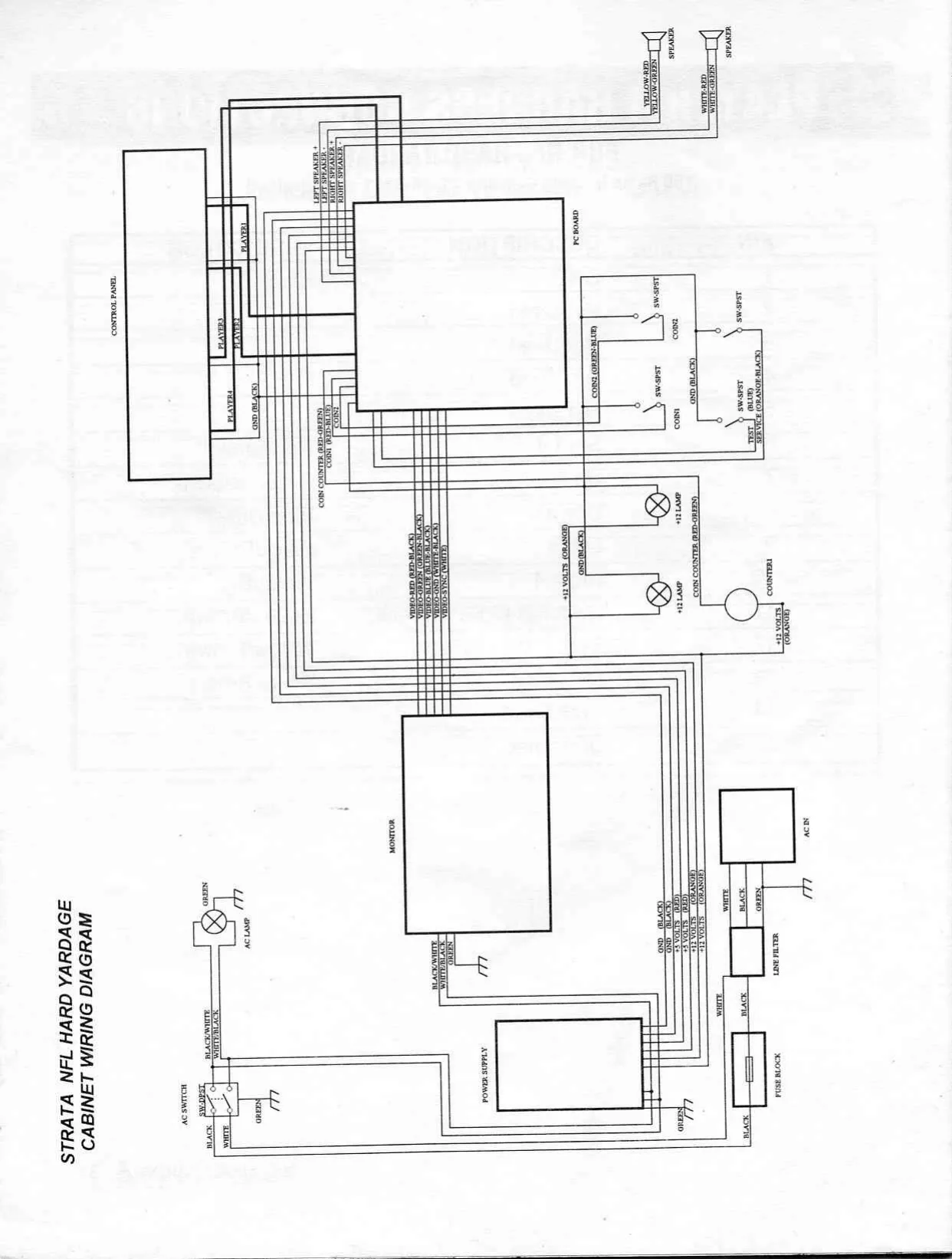
This page is a drawing, shown as the original scan.
STRATA NFL HARD YARDAGE
W/O SECTION
This page carries no recoverable text. It is a drawing or a photograph. See the original scan.
Strata Group, Inc.
Service/Saces (800)262-0323 Fax (708)870-0120
Hardware and Software © Copyright 1993 Incredible Technologies, Inc. All rights reserved. NFL Shield and Team Insignias ©/TM NFL Properties, Inc. All rights reserved. NFL Footage Copyright NFL Films, Inc. All rights reserved.
An Officially Licensed Product of the NFL.
4010 WINNETKA AVENUE ROLLING MEADOWS, IL 60008-1374 (708) 870-7006