Battlezone DP-156-2nd-02B
Battlezone (rev 2) (Atari, 1980) · Drawing Package · 1 pages · original scan
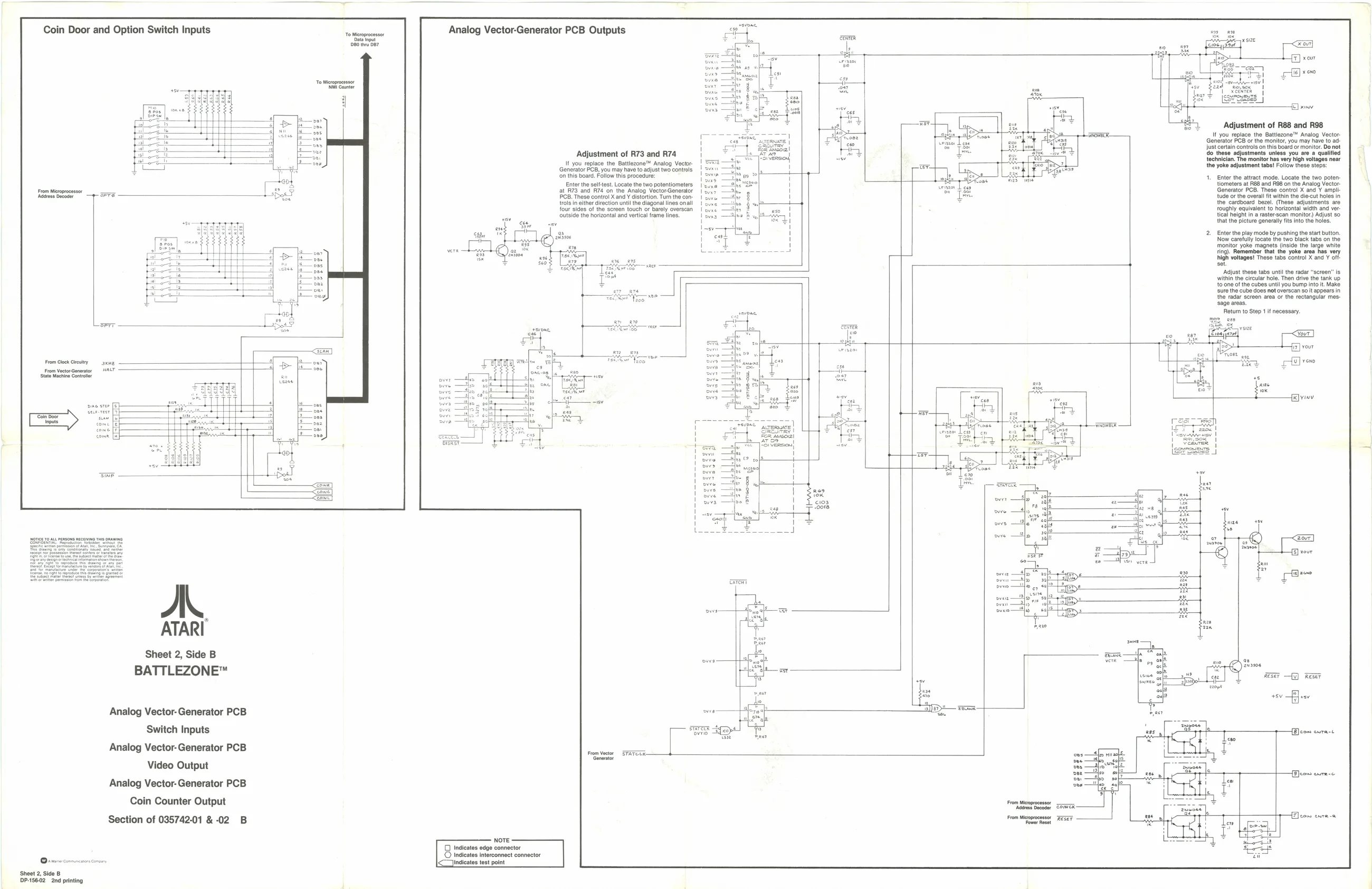
Coin Door and Option Switch Inputs
Analog Vector-Generator PCB Outputs
Adjustment of R73 and R74 It you replace the Bat may| ‘on this board, Follow this procedure: Enter the self-test. Locate the two potentiometers at R73 and R74 on the Analog VectorGenerator Veene Teves —2h OB. These control X and ¥ distortion. Turn the con-
trols in ether direction until the diagonal lines onall
four sides of the screen touch or barely overscan Outside the horizontal and vertical frame lines.
DP-156-02 2nd printing
Sheet 2, Side B
BATTLEZONE™
Analog Vector- Generator PCB
Switch Inputs
Analog Vector- Generator PCB
Video Output
Analog Vector- Generator PCB
Coin Counter Output
Section of 03574201 &-02 B oareTR owe.
- xv
Adjustment of R88 and R98. If you replace the Baltlezone™ Analog Vector- Generator PCB or the monitor, you may have to adjust certain controls on this board or monitor. De not do these adjustments unless you are a qualified {echnician. The monitor has very high voltages neer the yoke edjustment tabs! Follow these stops:
Enter the attract mode. Locate the two potentiometers at R88 and 98 on the Analog Vector- Generator PCB. These control X and Y ampli: tude oF the overall it within the die-cut holes in the cardboard bezel. (These adjustments are roughly equivalent to horizontal width and vertical height in a raster-sean monitor) Adjust so that the picture generally fits into the holes. Enter the play mods 9 Now carefully locate the two black tabs on the ‘monitor yoke magnets (inside the large white fing). Remember that ‘area has very high voltages! These tabs control X and Y off: set Adjust these tabs unttl the radar “screen” Is. within the circular hole. Then drive the tank up to one of the cubes until you bump into it. Make ‘sure the cube does not overscan soit appears in the radar screen area or the rectangular mes- ‘sage areas. Return to Step 1 if necessary.
1—[B]com cura-t