Battlezone Cabaret DP-166-1st-02B
Battlezone (rev 2) (Atari, 1980) · Drawing Package · 1 pages · original scan
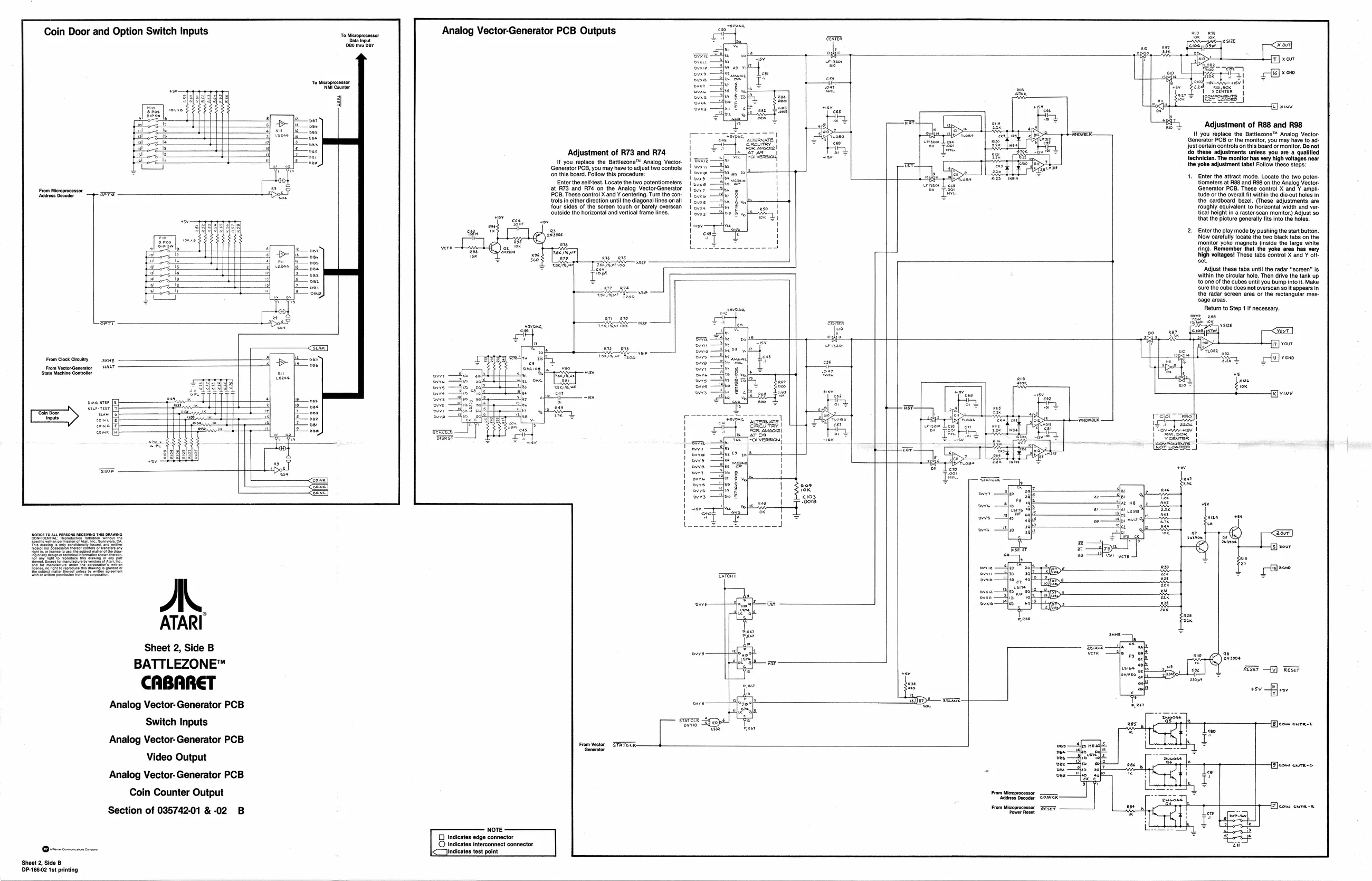
Coin Door and Option Switch Inputs
Analog Vector-Generator PCB Outputs
Adjustment of R88 and R98 It you replace the Battlezone™ Analog Vector.
Generator PCB or the monitor, you may have to ad
Just certain controls on this board or monitor. Do not
do these adjustments unless you are a qualified technician. The monitor has very high voltages near the yoke adjustment tabs! Follow these steps: Adjustment of R73 and R74 (
' If you replace the Battlezone™ Analog Vecior. | PE —F) cand 2Eattagtee agettinese | Son
a ease adeg Veueedenone |=
- Enter the attract mode. Locate the two poten: tiometers at R88 and R98 on the Analog Vector: Generator PCB. These control X and Y ampli tude or the overall fit within the diecut the cardboard bezel. (These adjust:
roughly equivalent to horizontal width and ver
tical height in a raster-scan monitor) Adjust 80
thatthe picture generally fits into the holes,
Enter the play mode by pushing the start button. Now carefully locate the two Black tabs on the monitor yoke magnets (inside the large white Ting). Remember that the yoke area hi very high voltages! These tabs control X and Y oft: set ‘Adjust these tabs until the radar ‘screen” is within the circular hole. Then drive the tank up toone of the cubes until you bump into it. Make sure the cube does nat overscan so it appears in the radar screen area or the rectangular message areas. Retum to Step 1 if necessary.
your
From Glock Creuty ski From VectorGenartor WALT ‘stato Machine Contatar
Sheet 2, Side B
BATTLEZONE™
CABARET a i) Wee
2 sp — To v Analog Vector- Generator PCB eee if 2 i Switch Inputs [ Gti {Econ eure-t Analog Vector-Generator PCB —— ned “mene oe Hh nfo Video Output ase
Analog Vector- Generator PCB
Coin Counter Output
Section of 035742-01 & 02 B