X-Men 4 Player Instruction Manual
X-Men 4 Player (Konami, 1992) · Instruction Manual · 17 pages · 16 sections · original scan
KONAMI"
™
4, PLAYER
THE UNCANNY X-MEN and all Marvel characters: TM & copyright © 1992 Marvel Entertainment Group, Inc. All Rights Reserved. © 1992 Konami. All Rights Reserved. © Konami Inc. 1991 Konami® is a trademark of Konami Co., Ltd.
Service & Parts
708-215-5100 Jerry Korbecki (Service Manager) ext. 122
INSTRUCTION MANUAL
KONAMI® is a trademark of Konami Industry Co., Ltd.
Part No. 065410
X-MEN 4 PLAYER PARTS LIST
Part # Description
065011 DC Harness
065110 Control Panel Overlay 065111 ~—- Player Instruction Decal 065210 Marquee 065253 X-MEN 4 Player PC.B. 065310 Upper Right Side Decal 065311 Upper Left Side Decal 065312 Middle Right Side Decal 065313 Middle Left Side Decal 065314 — Lower Right Side Decal 065315 — Lower Left Side Decal 065410 Instruction Manual
072010 AC Harness 30255 Red Micro Button 30256 Yellow Micro Button
30258 Blue Micro Button
30261 Micro Switch
30262 Palnut
30323 Red Joystick 30324 Blue Joystick 30325 Yellow Joystick 30328 Violet Joystick 35201 Isolation Transformer 35404 Power Supply 40356 Monitor Glass 40357 Marquee Glass 40524 25 Inch Monitor
40611 Monitor Bezel
CONTROL PANEL ASSEMBLY
Three Screws and Lock Washers are provided Taped Inside Control Panel. Please Assemble as shown.
X-MEN 4 PLAYER WIRING HARNESS
Solder Side
BLACK
BLACK
RED
RED
ORANGE
WHITE/GREEN
WHITE
WHITE/VIOLET
BLUE/YELLOW
VIOLETYELLOW
ORANGE/GREEN
ORANGE/YELLOW
BLACK/YELLOW
ORANGE/GRAY
ORANGE
BLACK
BLACK GND
GND
+5V DC
+5V DC
NOT USED
+12V DC Parts Side
GND
GND
+5V DC
+5V DC
NOT USED
+12V DC ‘xey| H | 7 | *key (EMPTY)
(EMPTY)
(EMPTY)
(EMPTY)
VIDEO GREEN
2P DOWN
2P LEFT
2P RIGHT
2P ATTACK
2P JUMP
2P MUTANT POWER
NOT USED
NOT USED
GND COIN COUNTER
(EMPTY)
(EMPTY)
(EMPTY)
VIDEO RED
VIDEO BLUE
VIDEO GROUND
TEST SWITCH
NOT USED
1P UP
1P DOWN
1P LEFT
1P RIGHT
1P ATTACK
1P JUMP
1P MUTANT POWER
NOT USED
NOT USED
(BASE COLOR/LINE COLOR) BLACK
BLACK
RED
RED
ORANGE
GREEN/VIOLET
RED/WHITE
BLUE/WHITE
BLACK
YELLOW
BLUE/VIOLET
ORANGE/WHITE
BLACK/WHITE
RED/GRAY
WHITE/GRAY
RED/WHITE
GREEN/ORANGE
RED/BLUE
BLACK
BLACK
X-MEN 4 PLAYER SUB HARNESS FOR 3 & 4 PLAYERS
| 1) Coin 3 Violet/White 2 | Empty | 3 | 3P Left White/Red 4 | 3P Right White/Yellow L 3] 3P Up Wilielblees | 6 | 3P Down White/Blue
| CN3 | 7 | 3P Attack | White/Brown |
SP | 8 | 3P Jump White/Orange CONTROLS 9 | 3P Mutant Power White | 10 | Empty | 11_| Empty 12 | Empty | 13 | Empty 14 | Empty 15 | Ground Black
1 | Coin 4 Blue 2 | Empty |_3 | 4P Left Yellow/Brown | 4 | 4P Right Brown/Black | 5 | 4P Up Yellow/Green 6 | 4P Down Yellow/Red
| CN4 | 7 | 4P Attack | Yellow/White |
| 4P | 8 | 4P Jump | Yellow/Blue |
CONTROLS 9 | 4P Mutant Power Yellow | 10 | Empty 11] Empty | 12, Empty | 13 | Empty 14 | Empty 15 | Ground Black
X-MEN 4 PLAYER TECHNICAL INFORMATION
TECHNICAL INFORMATION
- Required power capacity (3) There is no sound volume knob on the PCB. Sound GND-Vec 5V 5A or more level should be adjusted in the Manual Test mode. GND-( + 12V) (See next page.) *See the Wiring Diagram. (4) Handle with care.
- Output R (red) analog, positive G (green) analog, positive B (blue) analog, positive SYNC. H-V complexed, negative
PLAY INSTRUCTION
¢ 1 to 4 players can play at the same time.
- Choose the character you want to control out of the six individual X-MEN: Cyclops, Colossus, Wolverine, Storm, Nightcrawler and Dazzler.
- Deposit coins and the select screen will appear. Use the joystick to select character and press ATTACK, JUMP or MUTANT POWER button to decide and start the game.
- Control your character’s movement using the 8-way joystick and attack enemies with ATTACK button. Press ATTACK button repeatedly to punch, kick, throw, back-attack the enemies. Use JUMP button to avoid enemy attack or defeat enemies from the air. Pressing JUMP button longer makes higher jump. ¢ Press ATTACK button while in the air for a flying attack.
- Press MUTANT POWER button to use a powerful Mutant Power of each individualistic character. ¢ Use of Mutant Power will consume 3 units of energy. When the energy left is less than 3 units, a power ball will be consumed instead. A bonus power ball can be obtained for defeating the boss enemy of each stage.
- Your energy will be consumed when attacked by enemies. When it is used up, you will lose one life. The game is over when you have lost all the lives. ¢ There are 8 stages in all. You can continue the game as many times as you want. Any player can join at any time.
CABINET INFORMATION
- Use a multi control upright cabinet with four sets of an 8-way joystick and three function buttons.
- Four independent coin slots are necessary. Start buttons are substituted by the function buttons for each player. (If your cabinet is equipped with four start buttons, they also are effective to start the game.)
- If your PCB is “COMMON COIN MECHANISM” version, one or two coin slots are sufficient. In this case, four start buttons are necessary.
3 MUTANT POWER BUTTON a
| % | 1 | 2 |
| C | =) | aa |
| 8-WAY | ATTACK | JUMP |
JOYSTICK BUTTON BUTTON
X-MEN 4 PLAYER TECHNICAL INFORMATION (cont.)
SELF TEST
Normal: ‘‘OK”’ will be displayed. Then the game will start. Abnormal: ‘‘BAD”’ will be displayed and self test will repeat. If ‘13B BAD”’ is displayed, switch off and switch on again with TEST SWITCH (on the PCB) pressed.
MANUAL TEST
- HOW TO START After switching on the power, press the TEST SWITCH on the PCB or on the cabinet, and you will get the MAIN MENU of the Manuai Test.
- HOW TO RETURN TO THE GAME MODE Select ‘“EXIT’’ on the MAIN MENU then press player 1 ATTACK button to return to the game mode. “If your PCB is ‘COMMON COIN MECHANISM” version, use START button instead of ATTACK button.
- ITEMS AND HOW TO SELECT Use player 1 JOYSTICK to select the desired test and press player 1 ATTACK (START) button to initiate testing. Press player 1 ATTACK (START) button during or at the end of each test to return to the MAIN MENU.
VO CHECK SCREEN CHECK COLOR CHECK SOUND CHECK MASK ROM CHECK GAME OPTIONS COIN OPTIONS EXIT
PLAYER1 JOYSTICK=SELECT ITEM PLAYER1 ATTACK/START=DO CHECK
(4 EXPLANATION OF THE ITEMS
- VO CHECK Check all the joysticks and buttons to see ‘1’ when switched on. Press player 1 and 2 ATTACK (START) buttons at the same time to return to MAIN MENU.
- SCREEN CHECK Adjust focus, alignment, size, etc. using the cross-hatch screen.
- COLOR CHECK Adjust color brightness so that the specified area will be colorless. *
- SOUND CHECK When ‘“‘SOUND SCALE CHECk’” is selected, a music scale sounds. At ‘“SOUND CODE,” push player 1 JOYSTICK right/left to change sound code.
- MASK ROM CHECK Roms will be checked one after another, and the message “‘OK”’ or “BAD” will be displayed on the screen.
- GAME OPTIONS Following screen will appear. Use player 1 JOYSTICK up/down to select the item and push JOYSTICK right/left to modify setting. Factory settings are shown in green and modified results in red. (Settings below are not always the factory settings.) After modification is completed, select ‘SAVE AND EXIT” and press player 1 ATTACK (START) button to save and return to MAIN MENU.
X-MEN 4 PLAYER TECHNICAL INFORMATION (cont.)
PLAYER’S LIFE 1 CREDIT 3 LIVES DIFFICULTY LEVEL 4/MEDIUM MAXIMUM MUTANT POWER 9 VIDEO SCREEN FLIP NORMAL, SOUND OUTPUT STEREO SOUND IN ATTRACT MODE ALL THE TIME
SOUND VOLUME
FACTORY SETTINGS SAVE AND EXIT EXIT
PLYR1 JOYSTICK UP/DOWN=SELECT OPTION PLYR2 JOYSTICK RIGHT/LEFT=MODIFY SETTING GAME OPTIONS
. Select from 1 to 9 lives. ..-Select out of 8 levels. Maximum 9 or 3 “NORMAL’ or “UPSIDE DOWN” “STEREO” or “MONAURAL” Select out of 4 types: “ALL THE TIME,” “COMPLETELY OFF,” “ONCE EVERY 3 CYCLES” or “ONCE EVERY 5 CYCLES” . Adjust volume level between 0 and 30.
. All the settings return to default. ...Save the modified settings.
*If you select ‘“EXIT”’ instead of ‘SAVE AND EXIT” after modifying some settings, the message appears; “YOU DID NOT SAVE. DO YOU WANT TO SAVE? YES/NO.’ When you choose “YES,” the screen shows ‘‘NOW SAVING”’ and returns to MAIN MENU. if you select “NO,” “NO MODIFICATION” is shown and then MAIN MENU appears.
- COIN OPTIONS Selecting this item, the screen shows the following options.
COIN OPTIONS
PREMIUM START YES 1
STARTING 2 COINS 1 CREDIT
CONTINUATION 1 COIN 1 CREDIT
FACTORY SETTINGS SAVE AND EXIT EXIT
PLYR1 JOYSTICK UP/DOWN=SELECT OPTION PLYR2 JOYSTICK RIGHT/LEFT=MODIFY SETTING ...NO” or “YES 1” to “YES 4” (The number means the EXTRA coins necessary.)
| Same as above “GAME OPTIONS”
X-MEN 4 PLAYER TECHNICAL INFORMATION (cont.)
a
When you want “PREMIUM START” setting, choose the number of extra coins necessary for starting, then decide the coin setting for continuation. The number of coins for starting will be the sum of both numbers. If you do not set premium start, the number of coins necessary for starting and continuation will be the same.
- If your PCB is “COMMON COIN MECHANISM” version, the screen will be as follows. On the cabinet with two coin slots, coin setting must be done for each coin slot.
COIN OPTIONS
FREE PLAY NO COIN SLOT 1 1 COIN 1 CREDIT COIN SLOT 2 1 COIN 1 CREDIT
FACTORY SETTINGS SAVE AND EXIT Same as ‘GAME OPTIONS” EXIT
PLYR1 JOYSTICK UP/DOWN=SELECT OPTION PLYR2 JOYSTICK RIGHT/LEFT=MODIFY SETTING
*COIN SETTING OPTIONS
cons, [1 [1[il1[ilals[2lelels[s[3[4l4[4 crenis) [1 [2[sf4]sle[7]1[s]s]1l2[4]1]3]5
REAR DOOR!
INTERLOCK |
*NOTE COLOR CHANGE
7 BROWN, YELLOWIBLACK BLUE/GRAY TOP ON/OFF ‘SWITCH
FLUORESCENT BULB
POWER SUPPLY
1 BROWN
IH Im0n
COLOR MONITOR
ISO TRANSFORMER
11060 aay (EEE) 2018
X-MEN 4 PLAYER A.C. WIRING HARNESS
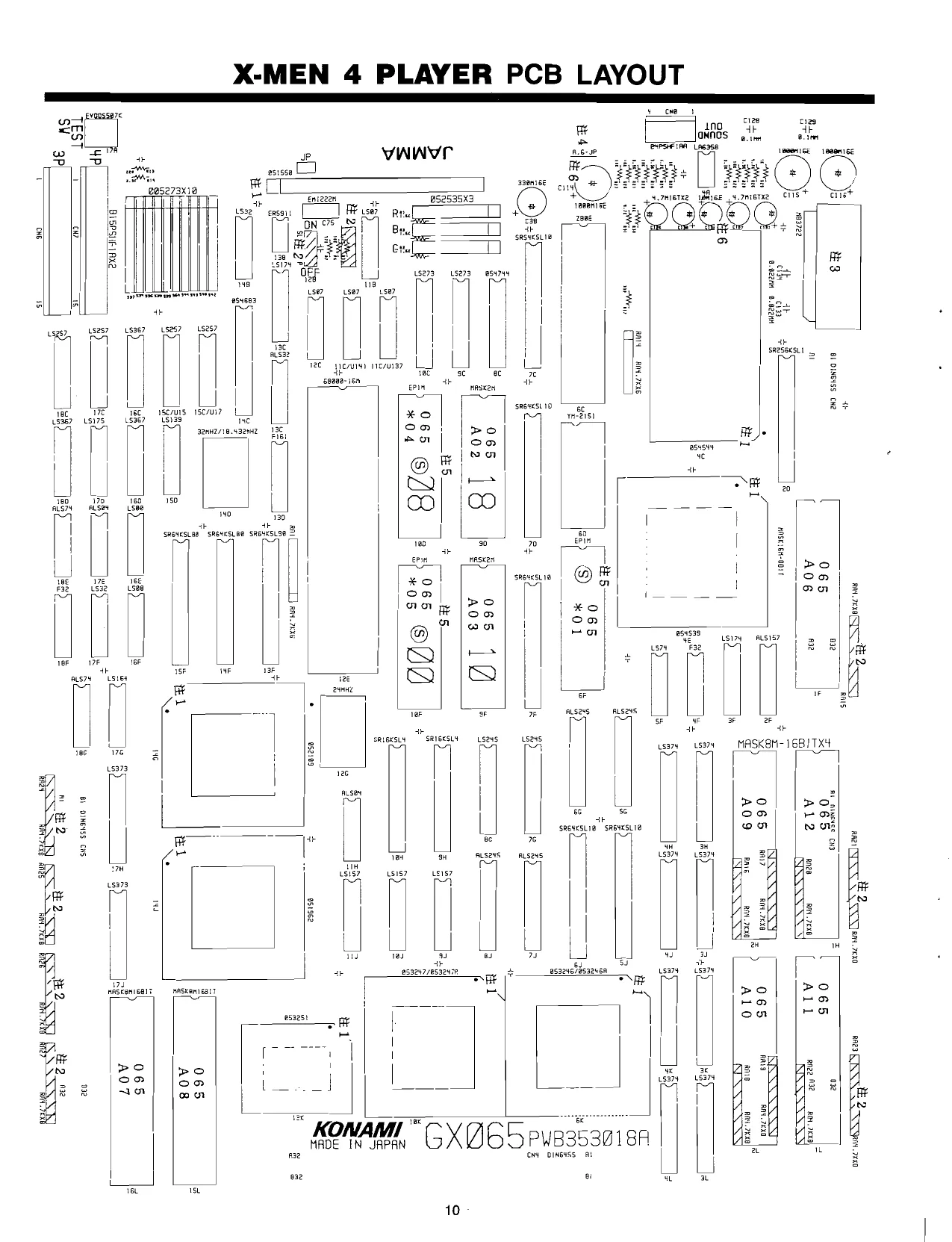
This page is a drawing, shown as the original scan.
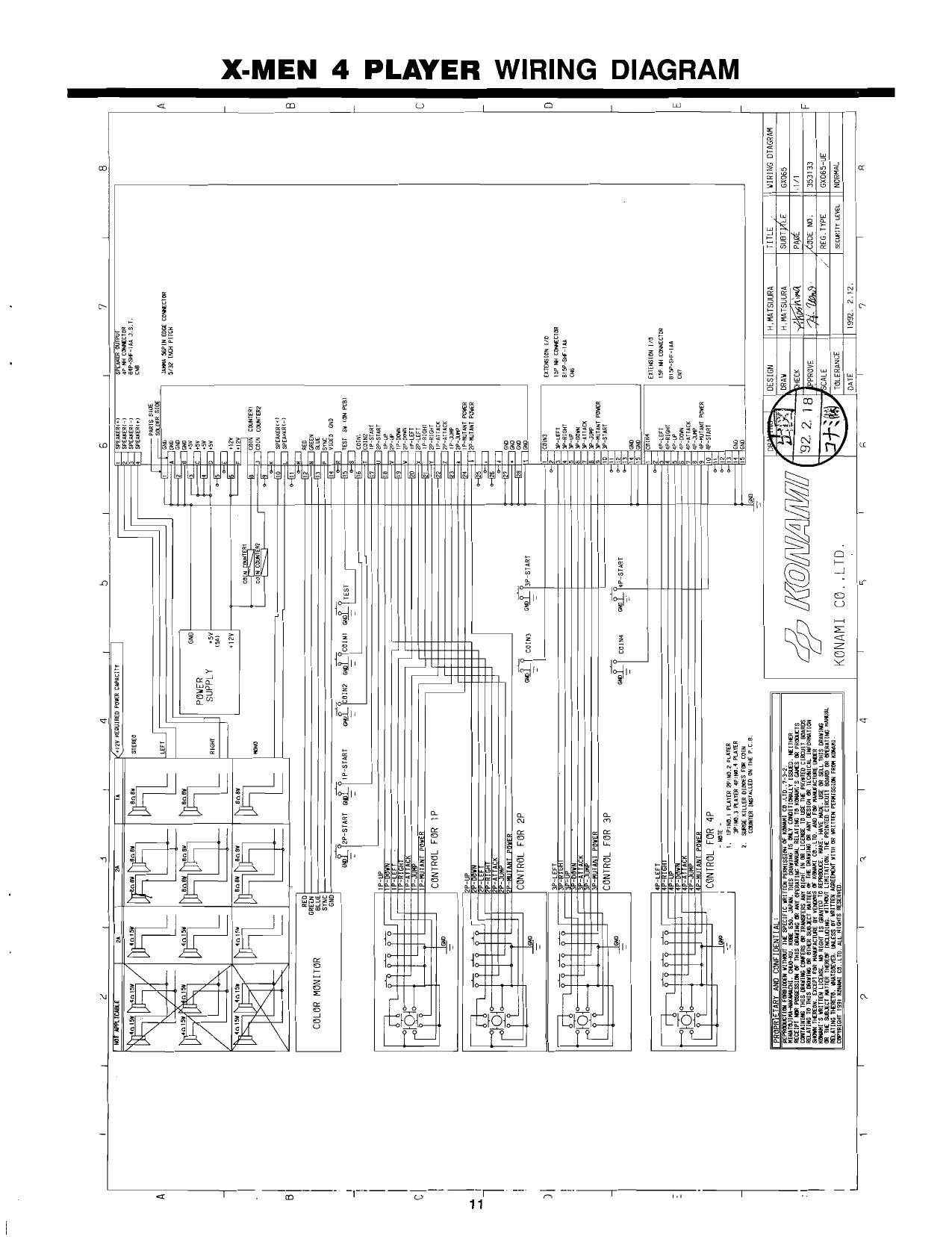
This page is a drawing, shown as the original scan.
| z | ! | Ei | L | 4 | L | 2 | ! | __b | 1 | L | 8 |
A [88lcns & B4P-SHF-1AA ay
| Tr | tite, | ton | tm, | Urn. | & | [Be | |
| aLen | 2Lcve | 2Lc79 | C80, | C118 | 123, | — | bs |
| ries | fe | i | Fionn | oo | BI5P-SHF-12A | ||
| i | 1 | 33] | |||||
| 3 | al car | aL cee | aces | ales | dei | [88lone | |
| iri hese | a | rrouivesce | i fresca | Bl fhesce | B15P-SHF-1AA | ||
| | | . | il | i | oa | |||
| al.cos | 2i ces. 7 | 2csr | 2lcize | a C120 | laa | ||
| ippamesce | rest | Fg lmesca | FO. THesca | FPO, esca | B8lons | ||
| 4 | | | DIN64SS |
os
88lona DING4SS e ee
88}cna DIN64SS ‘s +12 foca) 4 a
; _
| om | ET }o0 | if | 1, | 88 | |||
| oir | fea Jono | alse | aLcioy | aL cioe | aLciay | cra | Be cca |
| a | Z| | cEPPhosca | re lbiasca | «Se Mosca | sca | SS Ftsca | DING4Ss |
| oi | a | % | % | & | fe |
'GNO e8 elo J }A__}GNO ‘tir +12
| be | rc | deice | dL esee | ders | (a3) |
| ih AH25C A | [ 1H25ca, | 7 0. AMZOCA | CNT |
JAMMA 330K1 6E | Ad t —cne {25_] ono —F ro) typ Ut GND
a0
| RAVING | DESIGN | H. MATBUURA | TITLE | ] SCHEMATIC DIAGRAM! |
PROPRIETARY AND CONFIDENTIAL ll af
| REPRODUCTION FORBIODEN WITHOUT THE SPECIFIC VRITTEN PERMISSION OF KONAMI CO..L10,.7-3-2. | ORAW | H.MATBUURA | SUBTITLE | TOPOWER |
MINATOJiMA-NAKAMACHI. CHUC-KU. KOBE 650. JAPAN. THIS DRAWING IS ONLY CONDITIONALLY ISSUED. NEITHER ]
| RECEIPT NOR POSOESSION OF THIS DRAVING. GR” ANT OPENATING FAMUAL RELATING TO KOWAL 9 Caves’ of PRODUCTS | AVI/b | CHECK | aZhagimee | PAGE | ||||||||
| : | RELATING fo THis OMAF ING OF OTTER SUBSECT RATTCR OF THE BARRING OF ANY DEST OR FECINTCR NFERHE ON | i) | T cove No | 3531064 | ||||||||
| Sa artic BUA a ROT EA al OS MPO | wen | fale. _j oH | ||||||||||
| iceNSe, NO RIG | We | «OME of SELLS. | UNAWING | |||||||||
| gail SURE datfen THERE INELDIVE, VINOLY LIMITATION TE PaWTeD cIGCLLT Bea) G7 OPERATING RAWAL | SCALE | REG. TYPE _ | GXDES_PYB3950084 | ||||||||||
| otal et Kan | "E15, AL Riga foSeaeoe ent PU OF WRETEN FERMION FROM KOH | KONAMI CO.,LTD | TOLERANCE | secur weve._|] | CONFIDENTIAL | |||||||
| | | DATE | 1992. 2.27 | ||||||||||
| To | > | T | 7 | T | 7 | r | = | = | 1 | 7 | 1 | a |
°
| é | 1 | 2 | ! | 4 | i | > | 1 | 6 | i | / | fl | 8 |
‘tose > PLAYER2 __
| +5. | 5050 | a | -——#- | |
| ron DHE | 7 | - | ~ | \ |
S65, 287 EVO-aS5-07%
| 4pcoN [Tha | i | 2 | Heh | Fe |
| secotn [JRL | ; | " | Jeof Fy | a |
| aPseT3 |! | }2 | me | 1 | LW |
| ‘3PSHOOT3: | n | | | sd | |
| i | 7 | 13 | ° | bt |
| ls | 2 | v0 | ||
| 17% | [ | 7 | test CiSkgy | |
| 4PSHOOT2: | Ey | 2 |
Sacer [eae
| senor [78 | B | ‘ |
| spswear! [alee | iF | E |
138 apstant C10} : Sort oe
| $37 | vie | * | zesraet ue | |||
| 00527 | 1 1$257 | vesrart | Ciz}ott | ‘nso | ||
| 8 | a | 43 fgg3e0 | a | |||
| erator | (a | “oy | fo | lie | 1 | 15367 |
| Saree | [da | as | 138 | wl | a | |
| APLEFT | 3} | Me | y23 | 18tap | tt | |
| cnr, | i | }3-—_}—p'o | %5| |
1 oy
| secert | ae | aoe | La, | 4 | L |
| fcc ono ff | Bs | ale | | | 4 |
a 2
MA ghee GiGe me 1 roo C75}
| 3Po0WN | [6 | ‘ | |
| app [3 | \ | wis! | |
| sar | 3} | S367 | Cc |
¥6 + ¥5
L257 a
| zeeoin [1] | 2 | 1? | n | ||
| cow {6} | aPsenv | e162 | |||
| zesiors |7a/ eH | 5 | 6 | SPOERY | via | L |
| resnoors | [gatctl | 2PSERV |
reser (alee
& UINS vee
| eat | L832 | LS175, | ||||
| meswoore [Atay | 1024 DWS—1BPS | 1 | m | ahs | oa | |
| resieare | [-23foht | ae | | | MYUT 5 50¢¢ | ||
| zeseoori | [Zit | 10 | Whe | gale | SONS eosc | D |
| iwswoort Lalo! | - | ol | ||||
| f_} _AFE P1010 | 9 | Sly) | : | VOHRA 1 02 |
0 ALSO
| apnicut [Th | al | MBL ps son, | |||
| veriGaT | [ELSE | Bis | vale | Tre | _ |
| inet Daj | at | Yll | — | ||
| ert | [ Zo} | Int | SET | ||
| om | $AAhice_ ow fo | vier | aie |
_ $139 3 EO CBES D068
| $42 | c | ve | Paver? | tee, | |||
| 005273 | Me | PLAYER | mt | 7 z tsi oo | |||
| Ci, | i | 8, | 14 | \ | se | ||
| oon | Fal | fis | ie | a | Bos | ap | E |
| or | Ws | 3B~ | 3 | i | 10 | ||
| pup | [VI | k2¥2| | 44 | ||||
| veur CTa]eMt | ai | ont | Sie | a | a | ey ara | |
| Chicco HO | a) | oe | LL | ||||
| a | 3 | +—PGULS > 4020 | : | Dt | aul | SOC 016 | |
| vepo-—}—_f8 | 5020 | cea | 13¢ | |||||
| yi pL | 0B R66 | 92y, | q | |||||
| sose C-PLAYERI = _ | 10 | 6 | = |
vera DLS. ra
| e | ORAWING j | DESIGN | H MATSUURA | TITLE | SCHEMATIC DJAGRAM |
PROPRIETARY AND CONFIDENTIAL: t—
| REPROOUCTION FORBIODEN WITHOUT THE SPECIFIC WRITTEN PERMISSION OF KONAMI CO. .LTD..7-3-2. | ORAW | |ATSUURA | SUBTITLE | Ss01/0 |
| MINATOS(HA-NAKAMACHT. CHUQ-KU. KOBE 650. JAPAN. THIS ORAVING 1S ONLY CONDITIONALLY ISSUED. NEITHER | | 7, ‘j | r | ~ | |
| RECEIPT NOR POSSESSION OF THIS ORAVING OR” ANY GEERATING MANUAL RELATING TO KONAMI’S GAMES oR PRODUCTS | CHECK | PAGE | { | |
| CONTAINING THIS DRAWING CONFERS OR TRANSFERS ANY RIGHT IN OR LICENSE TO USE THE PRINTEQ CIRCUIT BOARDS | Uk | F | ||
| RELATING TO THIS. ORAVING OR OTHER SUBJECT MATTER OF THE’ DRAVING OR ANY OESIGN OR TECHNICX. TNFORKATION | APPROVE | CODE NO. | 3531068 |
Poet peaynres FOR Re a eens ene aE AND ie Tar ac Tne Ue RAVING
| "S VRITFEN | LICENSE. NO RIGHT IS GRANTED TO | REPRODUCE, | MAKE. HAVE MADE. US | a | - |
| OR THE SUBJECT MATTER THEREOR INCLUDING, ViTHOUT LIMITATION THE” PRINTED CIRCUS BOARD OR SPERATING Haunt | SCALE | REG. TYPE | GXO65_PWw8353018A | ||
| LATING THERETO. HATSOEVER. UNLESS BY’ WeLTTEX AGREEMENT | ViTH OP | WRITTEN PERMISSION | FROM | KONAMI. | + |
| [_Gorraicir tour KOwAnt Cp. 10. ALL RLONTS RESEmE | K@NAMI | C@..LTD. | TOLERANCE | security ever_|] | CONFIDENTIAL |
DATE 1992, 2.27
| T | = | 7 | T | ° | 2 |
2 T
| : | fl | c | ! | 2 | 1 | 4 | 1 | a | \ | __8 | - |
| } | ou | +5 | |||||||||
| _ | 13g Lstes | Oo |
aa ba A lan 57
| AB BG | t | 7 |
is 85 ug3 Pau Ik 84
| sose | ye Be | r | | | 052535 |
a0 vee HSA 1060 6
| 4 | tom De. | i} | a | our | raan-{ig_JeLue |
| a | u8s | ‘i | ae |
053251 1 cn * 24seL
| 98loo4 | 10 | a |
B $5\s010 ‘ Zeros css
| { | | | NAA sone | 0 | | |
s 4 7 = 4
0 uB4 aL 052535 4 fea ef vce 4 2
| 14 | 3 | 7 | 8 | rr | |
| C | rF | 2 | our | ear force | |
| 33] | [8 | x7 | |||
| : | a) | 7 | 2 | eyo op | |
| —fyfctos | lie | gfe. | ALSOA | Saf | ¥ |
| 20/107 | soot | 8 af | 12 suo | ||
| ‘gketos — sogo f2———10)_ | ry pip pose | i |
8)
| q | sett BB | 4 | _ |
4 NOL S|
| 4 | "7 | K |
a9 SRIGKSL4
| 08 | li | a | 7 | 2px |
cor 6
| 06 | 4 | 8 | a | ||
| C05 | oO} | _ | 13 | ||
| co4 | o} | “ | |||
| J | cos | oh | 7 | 2 | — |
| oo | age | 2 | 2 | ||
| 00 | or | fF |
24 hee vee ge 12 ul3e,
| os | a | iL 952535 | ||
| CS _OE _] gy | ea 13, | 12 | 4 | 42) VCC |
| 20 | PVs | uae | a) | |
| 4 | 8 | S07 | 24 | |
| Iz. | a | ft | _ | . |
| oe | a | cot ——} | 412 Jeo |
ap 18
| aw | Lso7 | x7) | ||||||
| “5 | = | fe | No | 2 | ovo] op | |||
| 0 | te | ; | ||||||
| q | u | Pp | ||||||
| . | ¥q | p+ | ore | |||||
| us7 | 128 | a | ra | |||||
| = | FI | L§367 | 4 | |GNO | ||||
| : | YOO | nosy | wh | 1 Re | a | po 1312 | ° | = |
| vo | | | qq Bese | fie | uta | ||||
| voo | 4G 180 | 100 | S07 | |||||
| woo |? | | | v0 | pik | IN | K | |||
| a0 | wo 3S 4 | zi Si | ||||||
| vss fl | ~ | NC | 1.5K |
VSS 108
| 7 | 59 | ‘ | ca | ||
| vss | ‘GNO | 2088 D>! | 2084 | Ts | ™ |
3 7 =
| [PROPRIETARY AND CONFIDENTIAL | ORAWING | DESIGN | Hi. MATSUURA | TITLE | SCHEMATIC DIAGRAM | |
| az | el | : | - | |||
| REPRODUCTION FORBIOOEN ¥ITHOUT THE SPECIFIC WRITTEN PERMISSION OF KONAMI CO..L1D...7-2-2 | 7 | DRAW | A. MATSUURA | SUBTITLE | 40cOLoR | |
| MINATOJIMA-NAKAMACHI. CHUO-KU, KOBE 650. JAPAN. THIS DRAWING [S ONLY CONDITIONALLY ISSUED. NEITHER | T | = | ||||
| RECEIPT no POSSESSION Oe THIS ORAVING, OF ANT GPERATING MANUAL RELATING To. OMAMI” GaPES Of PRODUCTS | O | A | CHECK | haAaine | PAGE | |
| - | CONTAINING THIS DRAWING COWECRS OR TRANGERE ar SIGHT WN OR LICEISE TO wSE THE PRINTED CIRCLIT BATS | Jy) | YA | | t | . | |
| LATING TO THIS. ORAWIN | SUB. | F THE DRAVIN | DESIGN OR TECHNICAL INFORMATION | y | . | 531068 |
| See ee gree a ce Neat | naa ea ea | 7 | wove | || By. is | | one. | 808 |
" CENSE, NO RIGHT 15 GRANTED TO REPRODUCE. MIKE. HAVE MADE. USE OR SELL. THIS ORAVING
| a je pei | ad Re. WITHOUT LIMITATION. THE PRINTED Eee OR OPERATING MANUAL | SCALE | REG. TYPE | GXOGS_PWB3530188 |
| LATING THERETO, | VER. UNLESS | BY VATTTEN AGREEMENT ¥ITH OR WRITTEN PERMISSION FROM KONAMT | ||
| {LCOPYRIGHT 1991 KONAMI CO..L7D. ALL RIGHTS RESERVED, | KONAM I C@..LTD | TOLERANCE | security ceveL || CONFIDENTIAL |
DATE | 1992. 2.27
| 2 | T | 2 | a | T | a | a | T | 7 | T | a |
: t]----NOTES----
| M | vecc+5v) | la |
U150 MASK2M
| fig | o7)_| | prs | a2 |
| bs | i | : | vec(+12V) |
| is | apt | N2 | |
| Al) | 02) 15 | i | |
| lio | ois | , | a |
ai i GND
| A? | co | ~ |
is re
| he | ° | (ey | JAMA EDGE 56P |
fo tee Q ° i
| Pt | ton pS) | (ome | 64P DIN CONNECTO |
| ——}-# | (hs | 64P DIN CONNECTOR |
(Ck = 64P._ DIN CONNECTOR
| "cr | —kas | 64P DIN CONNECTOR |
UL75: a ;
| on | 26| SR64KSE10 | (las «1 5P- NH CONNECTOR |
MASK2M op?
| his | 7 | : | Coan | =15P NH CONNECTOR | € |
| we | 3 | : | Coe | 4P NH CONNECTOR | |
| )A9 | 00] | ND | |||
| ie | . | KINDS GF | CAPACITOR |
is lho C :CERAMIC tM
| my) | E : ELECTROLYTIC | D |
M :MYLAR 7 T = TANTALUM ‘ gf ig} 051550 1020 p08. soso CAFE Te ick RESET }!0
| | | dp— | AVvner cunre [2 pag —]counene |
i Ter cunts F2—o aS Jour eee 4s curs 23 ad s) nce nce E =~
| wee | ull | [ | oe | ae | |||
| seve DUPER | jure | nel! | 3entlz-0 | ace | ti-osn | ||
| COINCTI | 1 | NCI | Fe) | 1 | 68) 4 | CKIGH oie | |
| soe | 7 | UT! | NCI | i | wa vec |} —> | onl! | 1088 |
| \ | GNO_GNO_jtta | —2\eno sur | |||||
| | | 13] 14 | ud. | 1 |
_ 24MHZ-0 | yaa
| ca | Bou! || | Sof | O24 Fen | * |
eG tH 7
| DRAWING | DESIGN | H. MATSUURA | TITLE | SCHEMATIC DTAGRAN| |
f PROPRIETARY ANO CONFIDENTIAL: Hi
| REPRODUCTION FORBIDOEN WITHOUT THE SPECIFIC WRITTEN PERMISSION OF KONAMI CO..(1D.. | ORAW | H.MATSUURA | SUBTITLE | JOCPU | j | |
| MINATOJTHA-NAKAMACHT. CHUO-KU, KOBE’ 650. JAPAN. THIS ORAVING IS ONLY CONDITIONALLY ISSUED. NELTHER | 7D | i | i[, | - | > | Saas |
| RECEIPT NOR POSSESSION.OF THIS ORAVING OR ANT” OPERATING MANUAL RELATING TO KONARL"S SAVES’ Op PRODUCTS | 4 | CHECK | Pecan | PAGE |
Covrafnne THIS ORAUING COWES. or TRANSFERS AN AIGHT I Of CICENBE. 10 USE THE PAINTED CIRCUTT DARDS A F
| RELATING TO THIS ORAWING OR OTHER SUBJECT MATTER OF THE DRAVING OR ANY DESIGN GR TECHNICAL INFORMATION | APPROVE | bi Mind | CODE NO. | 13531060 | |||
| Goorntonr 1991 KONAMI’ CO<LTD, ALL RUGHTS RESERVED | ile | : | | | KONAMI | CO.,LTD. | TOLERANCE | security cever || CONFIDENTIAL |
DATE 1992, 2.27
| 1 | 2 | i | a | a | T | 5B | Fs | T | 7 | 2 |
THIS EQUIPMENT COMPLIES WITH THE REQUIREMENTS IN PART 15 OF FCC RULES FOR A CLASS A COMPUTING DEVICE. OPERATION OF THIS EQUIP- MENT IN A RESIDENTIAL AREA MAY CAUSE UNACCEPTABLE INTERFERENCE TO RADIO AND TV RECEPTION REQUIRING THE OPERATOR TO TAKE WHATEVER STEPS ARE NECESSARY TO CORRECT THE INTERFERENCE. THIS DEVICE MUST ACCEPT ANY INTERFERENCE RECEIVED, INCLUDING INTERFERENCE THAT MAY CAUSE UNDESIRED OPERATION.
KONAMI"
900 Deerfield Parkway, Buffalo Grove, 60089-4510 Telephone: (708) 215-5100, Telex: 6871385 KONAM UW, Fax: (708) 215-5122